
 Mike Friedman
One of the downsides with finding award travel is that, frankly, it’s a pain to hunt down which flights are available for which dates. (Hint: ExpertFlyer) For infrequent flyers, though, that’s not really an issue, since you are not booking more than once or twice per year.
But if you travel frequently, particularly on award travel, it may be worth paying for a subscription service that allows you to search everything in one spot. The one that I use and would recommend is ExpertFlyer. Not only does it provide all the information that you will need for awards but it is extremely easy to use. If you’re looking for an award, upgrade or even a paid flight, just put in the date, airline and class of service and it will do all the work for you.
Finding Award Travel
How Much Power Do I Need?
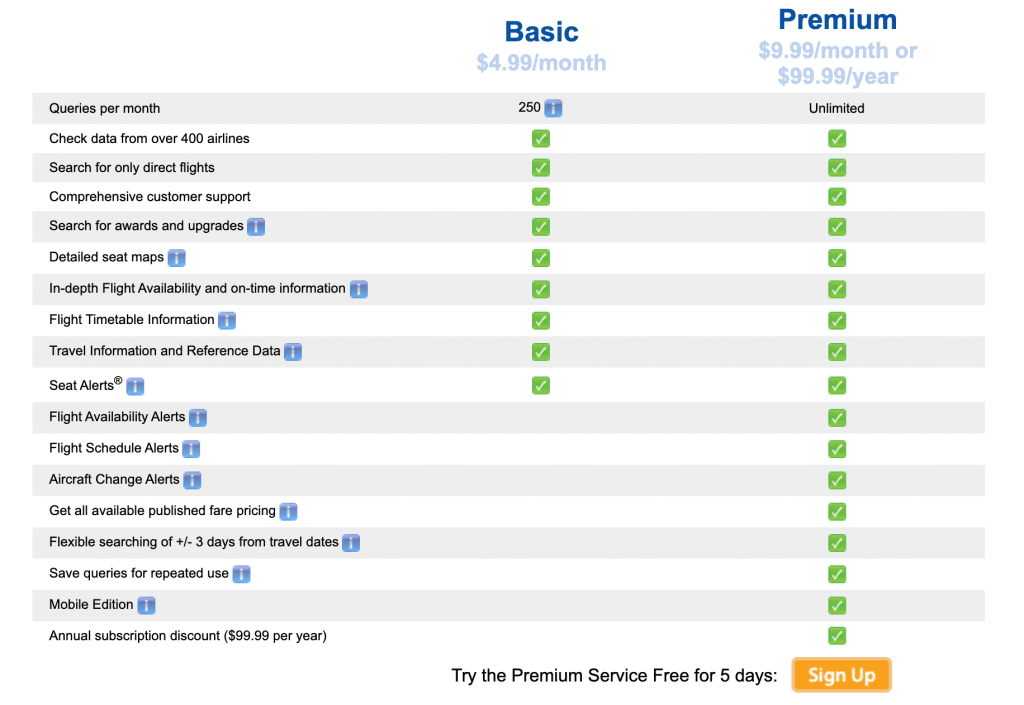
If you’re going to subscribe, do yourself a favor and get the premium service. It’s not much more and gets you significantly more powerful tools. Flight alerts, which will send you an email when a seat that you want opens up (for instance, if you are waiting for an award seat on a particular flight), is one of the most helpful aspects of the site. You can also do a flexible search, which allows you to find a flight over a multi-day period without typing in the same information over and over.
How Do I Use It? – ExpertFlyer
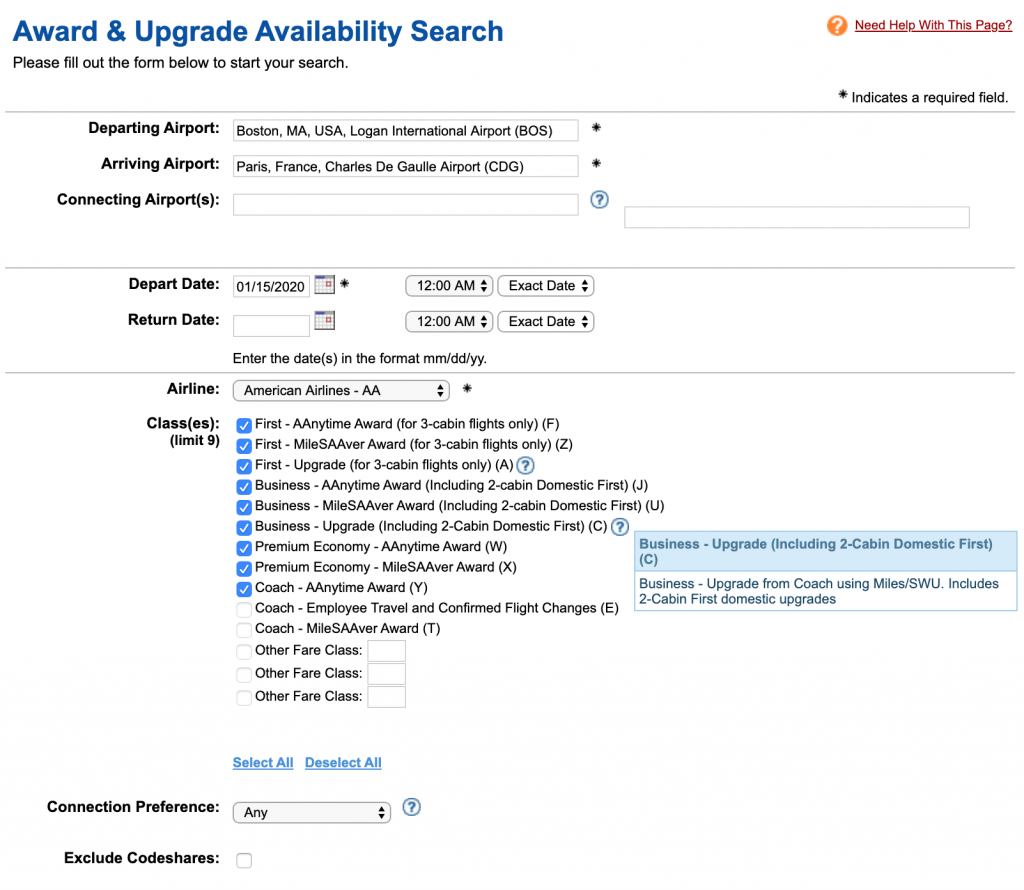
To start, input the details of the flight you want to take. You can specify classes of service, who you are willing to fly and even if you want discounted mileage tickets or are willing to pay for their “anytime awards,” which cost more but have no blackout dates.
It’s easy enough that even I can do it. For example, I’m looking for a flight from Boston to Paris on American. I simply go to the Award/Upgrade screen like you see above and fill in the required information.
Fare Codes – ExpertFlyer
See all of those letters in parentheses to the side? Those are fare codes. Each type of award has one. They may look confusing, but most are self-explanatory. And if a code is ambiguous, just click on the “?” for an explanation. Here are the results of my search:
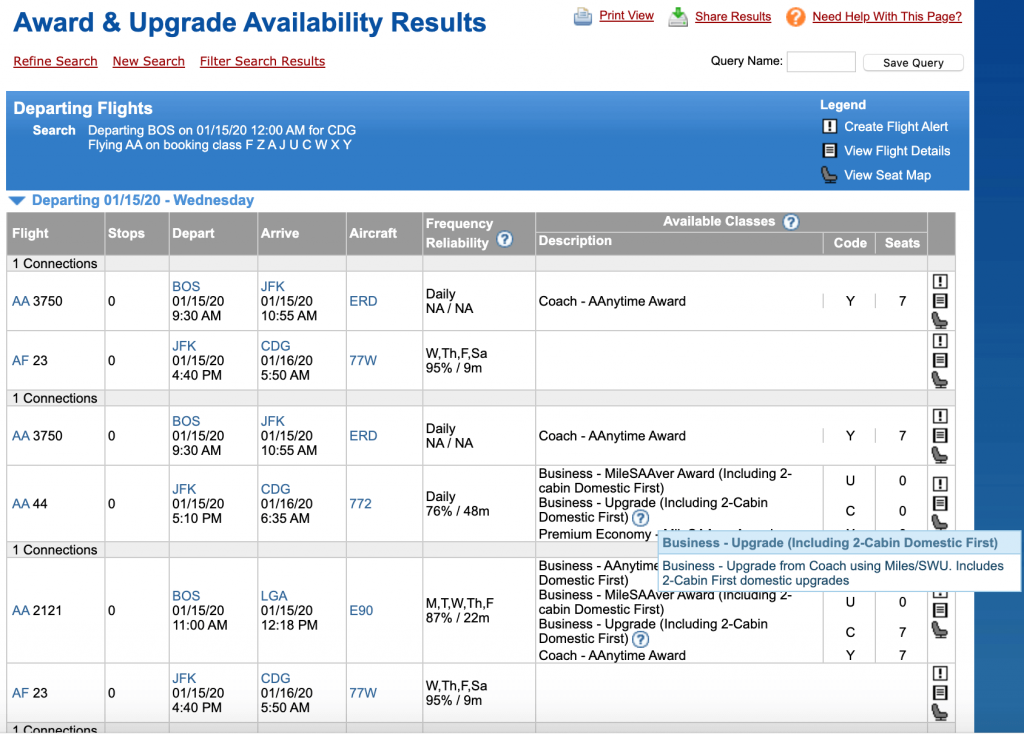
You have several options. The results above, for instance, show the connecting flights through JFK (including one that lands in La Guardia but leaves out of JFK). If you wanted to, you could list which connecting cities you want to include or exclude. This tool is particularly useful if you know that you want to go to a destination at a particular time of year but have a little flexibility and want to see all your options on one page.
Open/Available Seats – ExpertFlyer
The important information is all the way to the right. It tells you how many seats are open in each class of service. For example, on the non-stop, there are plenty of “AAnytime Award” seats, which require more miles. There are no SAAver awards, though, which are the discounted award.
Downside: Not all airlines make their inventory available on ExpertFlyer. American is the best, although Delta just started adding reward flights back. For a full list of whose inventory you can see, check here.
Once you play with the site a bit, you will be able to find the flights you want in a matter of seconds. If you want to take a lot of the hassle out of award travel, ExpertFlyer may be the tool for you.
- GUIDE TO POINTS AND MILES: Just the BASICS
- BEGINNERS GUIDE TO POINTS AND MILES: FOUR STEPS TO AIRLINE POINTS
- AIRLINE FREQUENT-FLIER PROGRAMS – MAJOR US CARRIERS
- HOTEL REWARDS PROGRAMS – THE BIG FOUR